

In Part 1 of this series, we explored how SQL Server Integration Services (SSIS) and Apache Hop differ in their architectural foundations and development philosophies. We examined how each tool approaches pipeline design, metadata management, portability, and developer experience highlighting the contrast between a traditional, Microsoft-centric ETL platform and a modern, open, orchestration-driven framework.
Architecture explains how a tool is built.
Adoption, however, depends on how well it runs in the real world.
In this second part, we shift focus from design philosophy to practical execution. We compare SSIS and Apache Hop across performance, scalability, automation, scheduling, cloud readiness, and operational flexibility the areas that ultimately determine whether an ETL platform can keep up with modern data platforms.
This comparison also reflects a broader transition currently facing many organizations. As Microsoft positions Microsoft Fabric as its strategic, cloud-first analytics platform, existing SSIS customers are increasingly encouraged to migrate or coexist within the Fabric ecosystem when modernizing their data platforms. Understanding how SSIS, Apache Hop, and Microsoft’s evolving cloud strategy differ in execution, cost, and operational flexibility is essential for making informed modernization decisions.
Performance & Scalability

SSIS is built around a highly optimized, in-memory data flow engine that performs well for batch-oriented ETL workloads, especially when operating close to SQL Server. Its execution model processes rows in buffers, delivering reliable throughput for structured transformations and predictable data volumes.
Within a single server, SSIS supports parallel execution through multiple data flows and tasks. However, scaling is primarily achieved by increasing CPU, memory, or disk capacity on that server.
Key Characteristics
- Efficient in-memory batch processing
- Excellent performance for SQL Server-centric workloads
- Parallelism within a single machine
- Scaling achieved through stronger hardware
This model works well for stable, on-premise environments with known workloads. As data volumes grow or workloads become more dynamic, flexibility becomes limited.
Apache Hop

Apache Hop approaches performance differently. Pipeline design is separated from execution, allowing the same pipeline to run on different execution engines depending on scale and performance requirements.
Hop supports local execution for development and testing, as well as distributed execution using engines such as Apache Spark, Apache Flink, and Apache Beam. This enables true horizontal scaling across clusters rather than relying on a single machine.
Key Characteristics
- Lightweight execution for low-latency workloads
- Parallelism across nodes, not just threads
- Native support for distributed compute engines
- Suitable for batch and streaming-style workloads
Because pipelines do not need to be redesigned to scale, teams can start small and grow naturally as data volumes and complexity increase.
Comparative Summary
Aspect | SSIS | Apache Hop |
Execution Model | Single-node | Single-node & distributed |
Scaling Type | Vertical (scale-up) | Horizontal (scale-out) |
Distributed Engines | Not native | Spark, Flink, Beam |
Cloud Elasticity | Limited | Strong |
Container/K8s Support | Not native | Native |
Workload Flexibility | Predictable batch | Batch + scalable execution |
Automation & Scheduling
SSIS: Built-in Scheduling with Tight Coupling
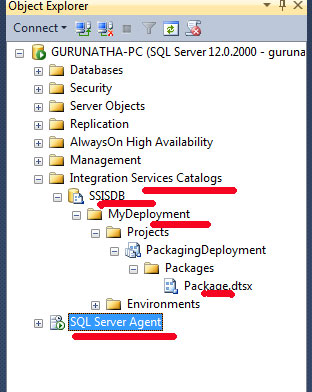

SSIS relies primarily on SQL Server Agent for automation and scheduling. Once packages are deployed to the SSIS Catalog (SSISDB), they are typically executed via SQL Agent jobs configured with fixed schedules, retries, and alerts.
This approach works well in traditional on-premise environments where SQL Server is always available and centrally managed. However, scheduling and orchestration logic are tightly coupled to SQL Server, which limits flexibility in distributed or cloud-native architectures.
Strengths
- Built-in scheduling via SQL Server Agent
- Integrated logging and execution history
- Simple retry and failure handling
Limitations
- Requires SQL Server to be running
- Not cloud-agnostic
- Difficult to integrate with external orchestration tools
- Limited support for event-driven or dynamic workflows
While reliable, this model assumes a static infrastructure and does not align naturally with modern, elastic execution patterns.
Apache Hop: Decoupled, Orchestration-First Automation
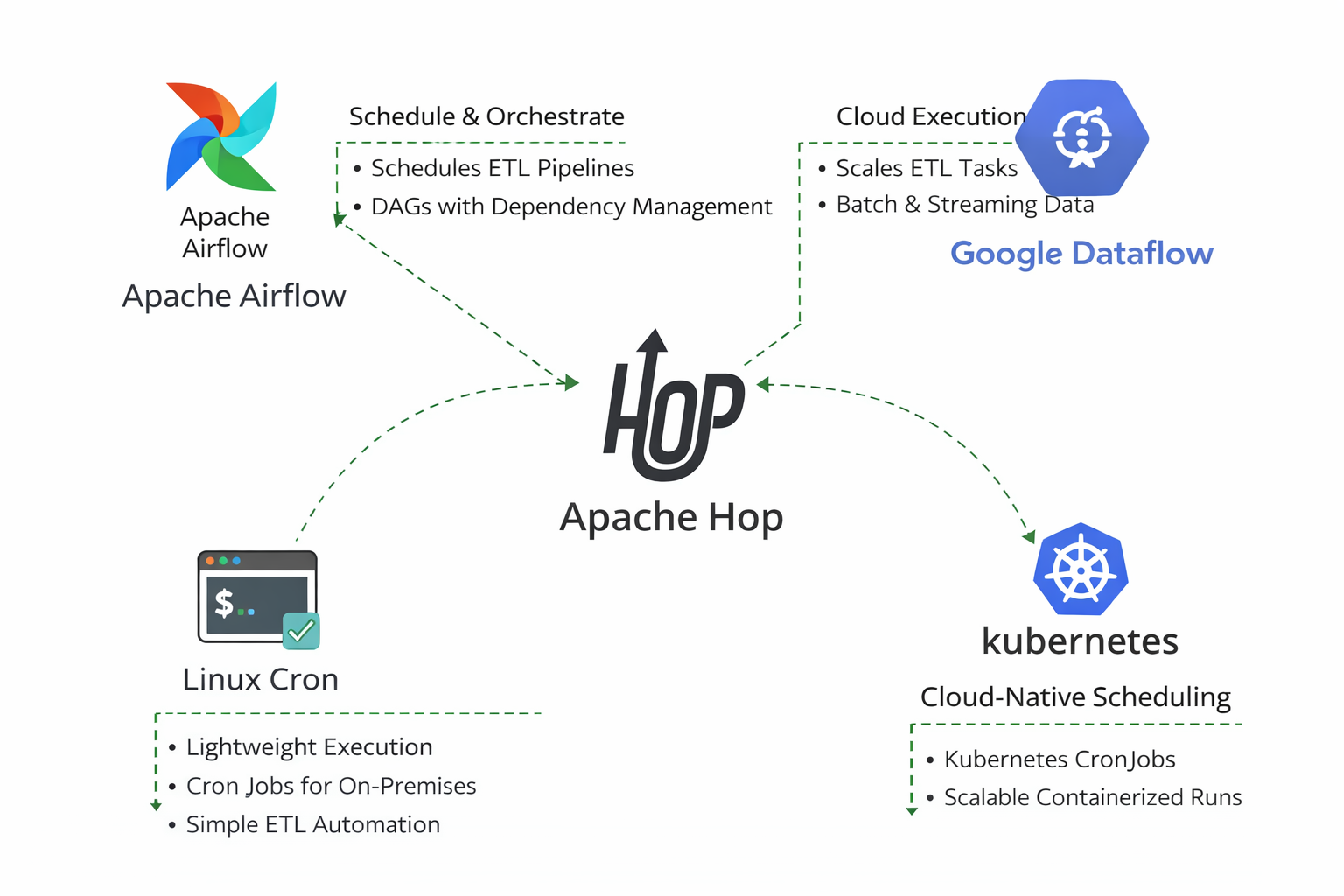
Apache Hop deliberately avoids embedding a fixed scheduler. Instead, it exposes clear execution entry points (CLI and Hop Server), making it easy to integrate with industry-standard orchestration tools. This allows teams to choose the scheduler that best fits their infrastructure rather than being locked into one model.
Scheduling Apache Hop on Google Dataflow

Lean With Data and the Apache Beam team at Google work closely together to provide seamless integration between the Google Cloud platform and Apache Hop. The addition to schedule and run pipelines directly on Google Cloud follows this philosophy. Now you don’t have to worry about provisioning resources and are only billed for the compute time you use. This allows you to focus more on business problems and less on operational overhead.
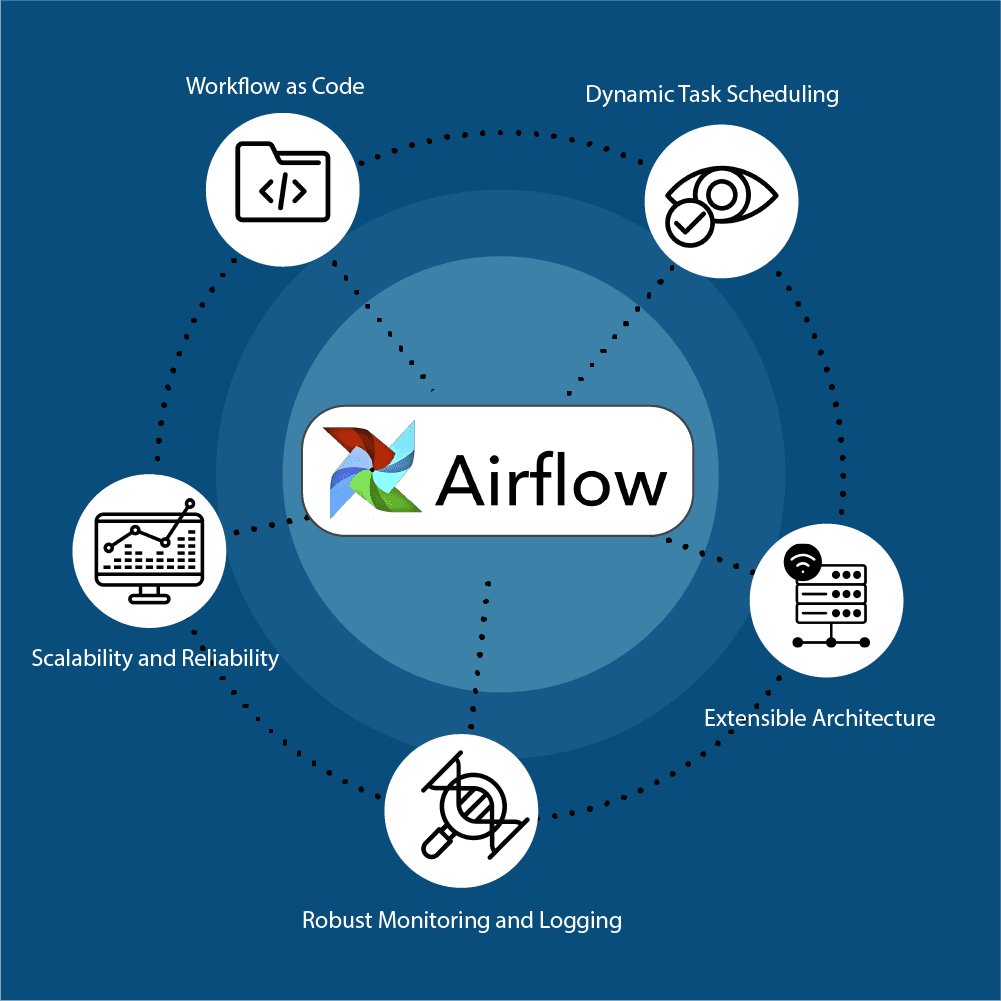
Apache Airflow is an open-source workflow orchestration tool originally developed by Airbnb. It allows you to define workflows as code, providing a dynamic, extensible platform to manage your data pipelines. Airflow’s rich features enable you to automate and monitor workflows efficiently, ensuring that data moves seamlessly through various processes and systems.

Apache Airflow is a powerful and versatile tool for managing workflows and automating complex data pipelines. Its “workflow as code” approach, coupled with robust scheduling, monitoring, and scalability features, makes it an essential tool for data engineers and data scientists. By adopting Airflow, you can streamline your workflow management, improve collaboration, and ensure that your data processes are efficient and reliable. Explore Apache Airflow today and discover how it can transform your data engineering workflows.
A detailed article by the Axonnet team provides an in-depth overview of how Apache Hop integrates with Apache Airflow, please follow the link:
Streamlining Apache HOP Workflow Management with Apache Airflow
Apache Hop with Kubernetes CronJobs
Apache Hop integrates naturally with Kubernetes CronJobs, making it well suited for cloud-native and container-based ETL architectures. In this setup, Apache Hop is packaged as a Docker image containing the required pipelines, workflows, and runtime configuration. Kubernetes CronJobs are then used to schedule and trigger Hop executions at defined intervals, with each run executed as a separate, ephemeral pod.
This execution model provides strong isolation, as each ETL run operates independently and terminates once completed, eliminating the need for long-running ETL servers. Environment-specific configuration, credentials, and secrets are injected at runtime using Kubernetes ConfigMaps and Secrets, enabling the same Hop image and pipelines to be reused across development, test, and production environments without modification.
Comparative Summary
Aspect | SSIS | Apache Hop |
Built-in Scheduler | SQL Server Agent | External (by design) |
Orchestration Logic | Limited | Native workflows |
Event-driven Execution | Limited | Strong |
Cloud-native Scheduling | Azure-specific | Kubernetes, Airflow, Cron |
CI/CD Integration | Moderate | Strong |
Execution Flexibility | Server-bound | Fully decoupled |
Cloud & Container Support
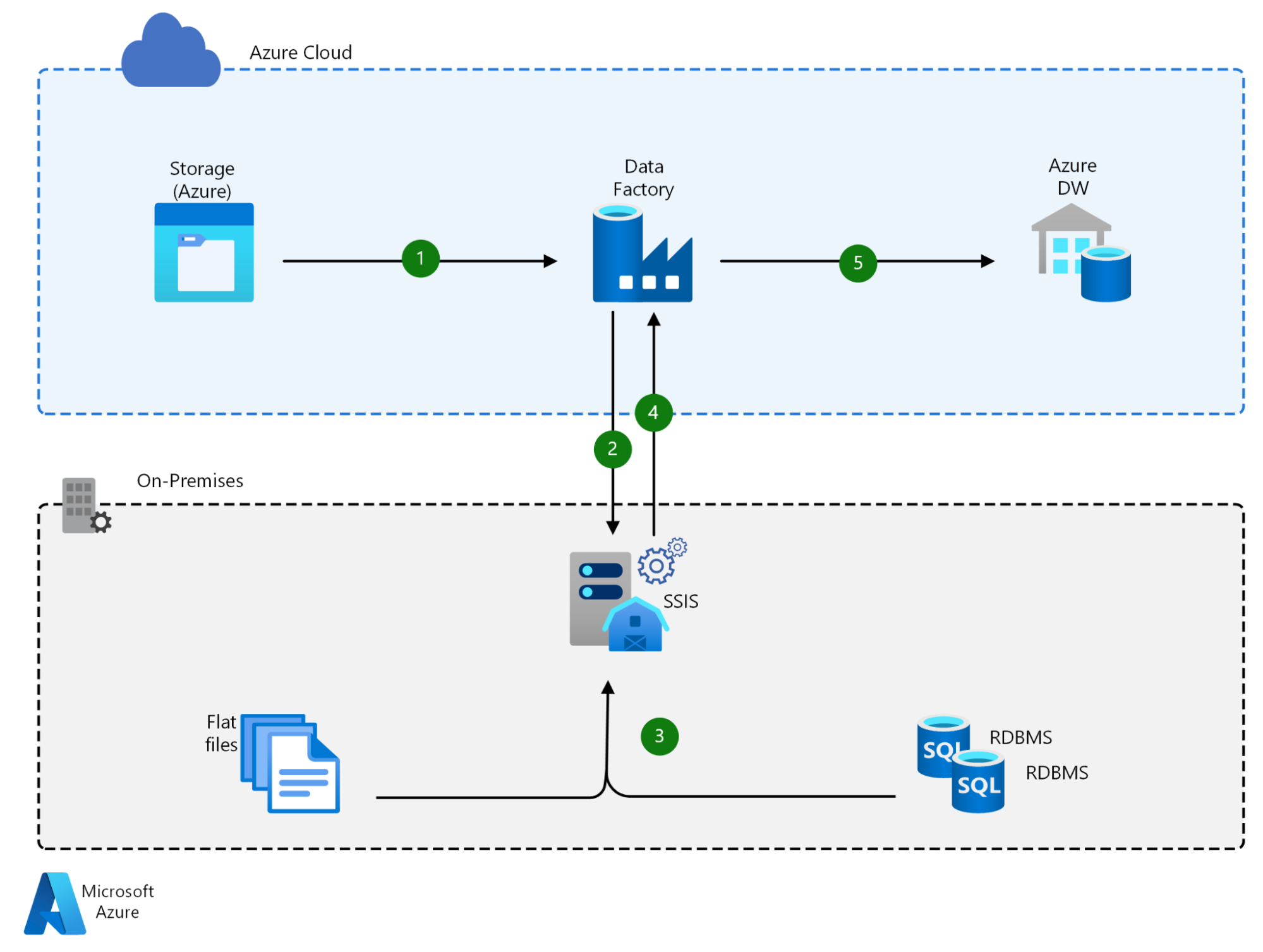
SSIS was designed for on-premise Windows environments, and its cloud capabilities were introduced later. In Azure, SSIS packages typically run using Azure SSIS Integration Runtime within Azure Data Factory.
While this enables lift-and-shift migrations, the underlying execution model remains largely unchanged. Packages still depend on Windows-based infrastructure and SQL Server-centric components.
Cloud & Container Characteristics
- Cloud support primarily through Azure Data Factory
- Requires managed Windows nodes (SSIS-IR)
- No native Docker or Kubernetes support
- Limited portability across cloud providers
- Scaling and cost tied to Azure runtime configuration
As a result, SSIS fits best in Azure-first or hybrid Microsoft environments, but is less suitable for multi-cloud or container-native strategies.
Microsoft Fabric: Microsoft’s Cloud Direction for SSIS Customers
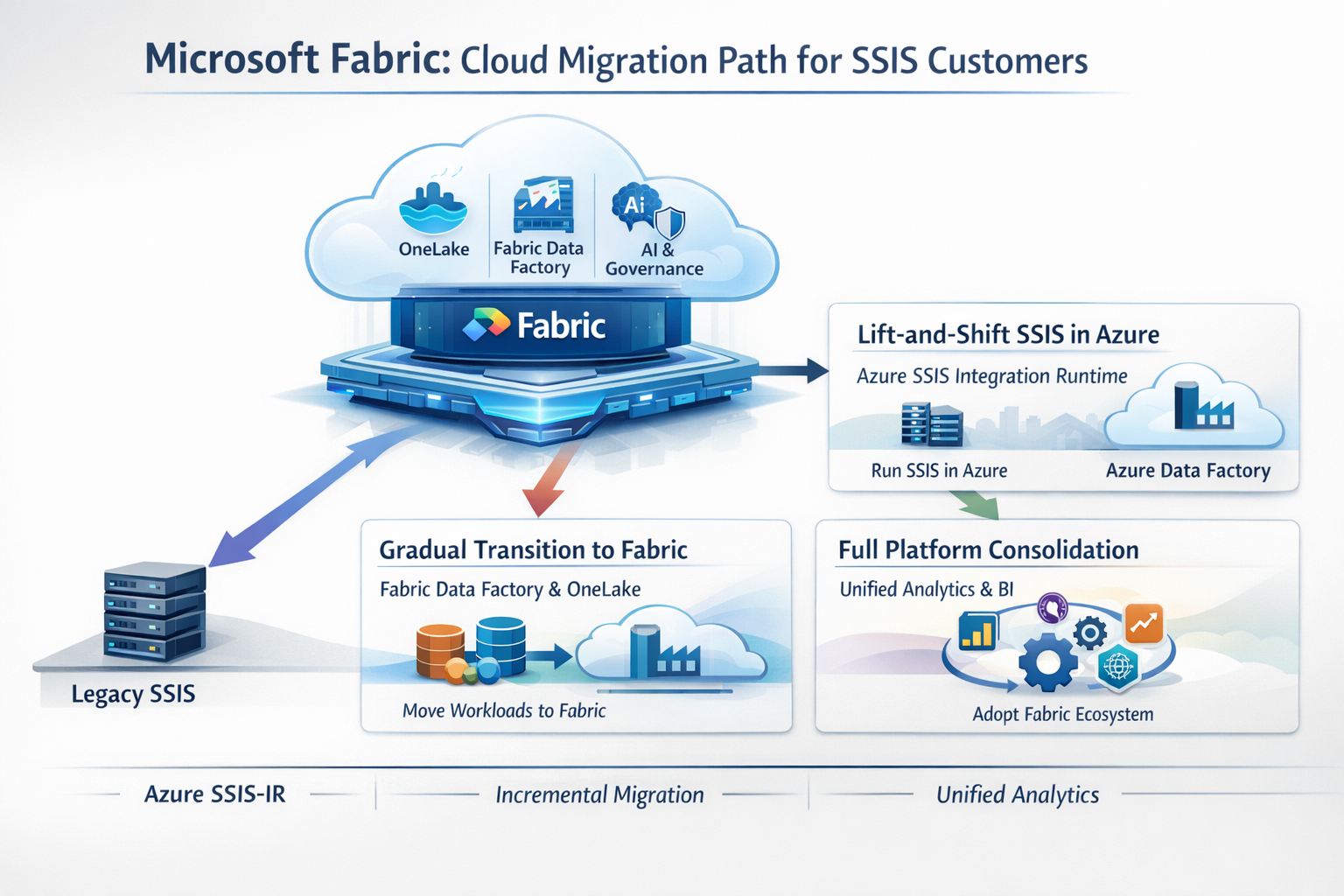
As organizations move ETL workloads to the cloud, Microsoft increasingly positions Microsoft Fabric as the strategic destination for analytics and data integration workloads including those historically built using SSIS.
Microsoft Fabric is a unified, SaaS-based analytics platform that brings together data integration, engineering, warehousing, analytics, governance, and AI under a single managed environment. Rather than modernizing SSIS itself into a cloud-native execution engine, Microsoft’s approach has been to absorb SSIS use cases into a broader analytics platform.
For existing SSIS customers, this typically presents three cloud-oriented paths:
- Lift-and-Shift SSIS Using Azure SSIS Integration Runtime
Organizations can continue running SSIS packages in the cloud by hosting them on Azure SSIS Integration Runtime (SSIS-IR) within Azure Data Factory. This approach minimizes refactoring but preserves SSIS’s original execution model, including its reliance on Windows-based infrastructure and SQL Server-centric components.
- Gradual Transition into Microsoft Fabric
Microsoft Fabric introduces Fabric Data Factory, which shares conceptual similarities with Azure Data Factory but is tightly integrated with the Fabric ecosystem. Customers are encouraged to incrementally move data integration, analytics, and reporting workloads into Fabric, leveraging shared storage (OneLake), unified governance, and native Power BI integration.
- Platform Consolidation Around Fabric
At a broader level, Fabric represents Microsoft’s strategy to consolidate ETL, analytics, and AI workloads into a single managed platform. For organizations already heavily invested in Azure and Power BI, this provides a clear modernization path, but one that increasingly ties execution, storage, and analytics to Microsoft-managed services.
Implications for Cloud Adoption
From a cloud and container perspective, Fabric differs fundamentally from traditional SSIS deployments:
- Execution is platform-managed, not user-controlled
- Workloads are optimized for always-on analytics capacity, not ephemeral execution
- Containerization and Kubernetes are abstracted away rather than exposed
- Portability outside the Microsoft ecosystem is limited
This makes Fabric attractive for organizations seeking a fully managed analytics experience, but it also represents a shift from tool-level ETL execution to platform-level dependency.
Apache Hop: Cloud-Native and Container-First
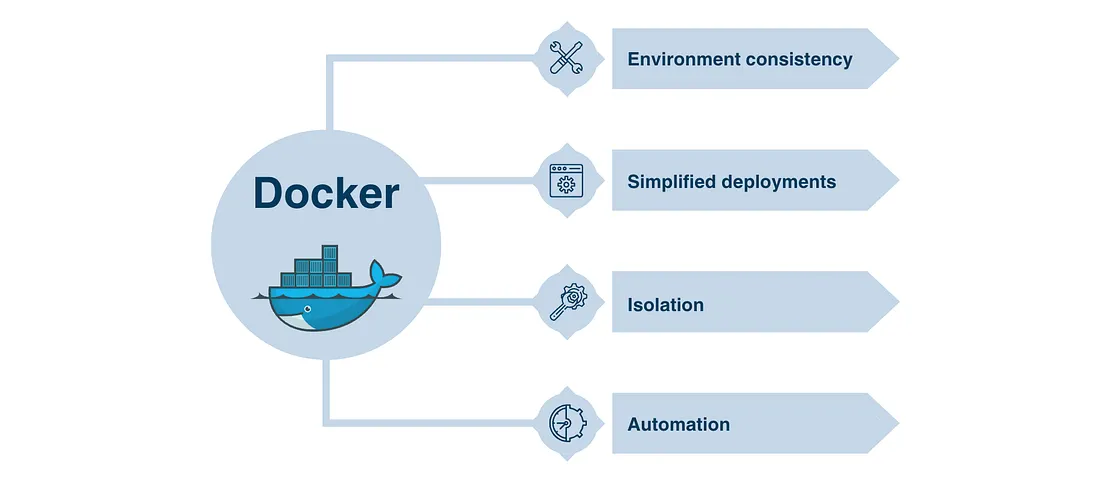
Apache Hop embraces container-based execution through Docker, allowing pipelines and workflows to run in consistent, isolated environments. ETL logic and runtime dependencies can be packaged together, ensuring the same behavior across development, testing, and production.
Configuration is injected at runtime rather than hardcoded, making Hop naturally environment-agnostic. This approach aligns well with Kubernetes, CI/CD pipelines, and ephemeral execution models.
					Example Command:

#!/bin/bash

# Run the workflow

docker run -it --rm \

  --env HOP_LOG_LEVEL=Basic \

  --env HOP_FILE_PATH='${PROJECT_HOME}/code/

flights-processing.hwf' \

  --env HOP_PROJECT_FOLDER=/files \

  --env

HOP_ENVIRONMENT_CONFIG_

FILE_NAME_PATHS=${PROJECT_HOME}/dev-env.json \

  --env HOP_RUN_CONFIG=local \

  --name hop-pipeline-container \

  -v /path/to/my-hop-project:/files \

  apache/hop:latest

# Check the exit code

if [ $? -eq 0 ]; then

    echo "Workflow executed successfully!"

else

    echo "Workflow execution failed. Check the logs for details".

Fi

This script runs the workflow and checks whether it completed successfully. You could easily integrate this into a larger CI/CD pipeline or set it up to run periodically.
Docker-based execution makes Apache Hop particularly well suited for CI/CD pipelines, cloud platforms, and Kubernetes-based deployments, where ETL workloads can be triggered on demand, scaled horizontally, and terminated after execution. Overall, this model aligns strongly with modern DevOps and cloud-native data engineering practices.
Cloud & Container Characteristics
- Native Docker support
- Kubernetes-ready (Jobs, CronJobs, autoscaling)
- Cloud-agnostic (AWS, Azure, GCP)
- Supports object storage, cloud databases, and APIs
- Stateless, ephemeral execution model
This architecture enables teams to build once and deploy anywhere, without modifying pipeline logic.
Comparative Summary
Aspect | SSIS | Apache Hop |
Cloud Strategy | Azure-centric | Cloud-agnostic |
Container Support | Not native | Native Docker & K8s |
Execution Model | Long-running runtime | Ephemeral, stateless |
Multi-Cloud Support | Limited | Strong |
CI/CD Integration | Moderate | Strong |
Infrastructure Overhead | Higher | Lightweight |
The “Microsoft Fabric Trap” (Cost & Strategy Perspective)
Cost vs Data Size RealityMicrosoft Fabric presents itself as a unified, future-ready data platform, combining data integration, analytics, governance, and AI under a single umbrella. While this approach can be compelling at scale, it introduces a common risk for small and mid-sized organizations what can be described as the “Fabric Trap.”
One of the most overlooked aspects of Microsoft Fabric adoption is the mismatch between platform cost and actual data scale.
For many small and mid-sized organizations, real-world workloads look like this:
- Total data volume well below 50 TB
- A few hundred users at most (< 500)
- Primarily batch ETL, reporting, and operational analytics
- Limited or no advanced AI/ML workloads
In these scenarios, Fabric’s capacity-based licensing model often becomes difficult to justify.
Key cost-related realities:
- You pay for capacity, not consumption
Fabric requires reserving compute capacity regardless of whether workloads run continuously or only a few hours per day. Periodic ETL jobs often leave expensive capacity idle. - Costs scale faster than data maturity
While Fabric is designed for large, multi-team analytics platforms, many organizations adopt it before reaching that scale resulting in enterprise-level costs for non-enterprise workloads. - User count amplifies total spend
As reporting and analytics adoption grows, licensing and capacity planning become more complex and expensive, even when data volumes remain modest. - Cheaper alternatives handle this scale well
Open-source databases like PostgreSQL comfortably support tens of terabytes for analytics workloads, and orchestration tools like Apache Hop deliver robust ETL and automation without licensing overhead. - ROI improves only at higher scale
Fabric’s unified analytics, governance, and AI features begin to pay off primarily at larger data volumes, higher concurrency, and greater organizational complexity.
For organizations operating below this threshold, a modular open-source stack allows teams to scale incrementally, control costs, and postpone platform consolidation decisions until business and data requirements genuinely demand it.
Which One Should You Choose?
Choose SSIS/Fabric if:
- Your ecosystem is entirely Microsoft
- Your datasets live in SQL Server
- You need a stable on-prem ETL with minimal DevOps complexity
- Licensing is not a constraint
- Your workloads justify always-on analytics capacity
- You are comfortable adopting a platform-managed execution model
- Vendor lock-in is an acceptable trade-off for consolidation
Choose Apache Hop if:
- You prefer open-source tools
- You need cross-platform or containerized ETL
- Your data sources include cloud DBs, APIs, NoSQL, or diverse systems
- You want modern DevOps support with Git-based deployments
- You need scalable execution engines or distributed orchestration
- You are a small to mid-sized organization modernizing ETL
- Your data volumes are moderate (≪ 50 TB) with hundreds—not thousands—of users
- You run periodic batch ETL and reporting, not always-on analytics
- You want cloud, container, or hybrid execution without platform lock-in
- You want to modernize without committing early to an expensive unified platform
Conclusion
Microsoft’s current cloud strategy places Fabric at the center of its analytics ecosystem, and for some organizations, that direction makes sense. However, for many small and mid-sized teams, this approach introduces unnecessary complexity, cost, and architectural rigidity, what we described earlier as the Microsoft Fabric Trap.
Apache Hop offers an alternative modernisation path:
One that focuses on execution flexibility, incremental scaling, and architectural intent, rather than platform consolidation.
Need Help Modernizing or Migrating?
If you’re:
- Running SSIS today
- Evaluating Fabric but unsure about cost or lock-in
- Looking to modernise ETL using Apache Hop and open platforms
We help teams assess, migrate, and modernize SSIS workloads into Apache Hop–based architectures, with minimal disruption and a clear focus on long-term sustainability.
Reach out to us to discuss your migration or modernisation strategy.
We’ll help you choose the path that fits your data, your scale, and your future, and not just your vendor roadmap.
Official Links for Apache Hop and SSIS
When writing this blog about Apache Hop and SQL Server Integration Service, the following were the official documentation and resources referred to. Below is a list of key official links:
🔹 Apache Hop Official Resources
- Apache Hop Official Website: https://hop.apache.org
- Apache Hop Documentation: https://hop.apache.org/docs/latest
- Apache Hop GitHub Repository: https://github.com/apache/hop
- Apache Hop Community & Discussions: https://hop.apache.org/community
🔹 SQL Server Integration Service Official Resources
Install SQL Server Integration Services – SQL Server Integration Services (SSIS)
Development and Management Tools – SQL Server Integration Services (SSIS)
Integration Services (SSIS) Projects and Solutions – SQL Server Integration Services (SSIS)
Other posts in the Apache HOP Blog Series
If you would like to enable this capability in your application, please get in touch with us at analytics@axxonet.net or update your details in the form